
The spare laptop on my desk still has a silver sticker on the bottom that reads “Property of” followed by the name of a university IT department.
I paid $140 for it at a campus surplus sale five years ago, and it has outlived two newer laptops since.
Before a charity can offer similar hardware to someone else, donated laptops pass through data erasure and component checks.
I left the sticker on as a reminder. The laptop was never broken. It simply reached the end of a spreadsheet column.
Plenty of used laptops share that history. Companies and schools retire them on a schedule, often with healthy hardware inside.
The trick is spotting a scheduled retirement and avoiding the few locks a factory reset will not remove.
Why Companies Retire Laptops That Still Work

Most IT departments replace laptops on a calendar, not when they fail. The decision usually comes from accounting, warranties, and software support rather than from anything wrong with the machine.
The common triggers look like this.
- A three or four year refresh cycle, often tied to a lease or the depreciation schedule
- An expiring manufacturer warranty that the company does not want to renew
- Windows 10 support ending on October 14, 2025, which pushed out laptops older than the Intel processors Windows 11 supports, starting with the 8th generation Core chips
- Standardizing on one model so the help desk stocks fewer spare parts
That third point matters right now. A wave of perfectly usable 6th and 7th generation business laptops hit the used market over the past year, not because they failed, but because Windows 11 will not officially install on them.
Where a Retired Company Laptop Goes Next

When a laptop leaves a well-run company, the drive gets wiped first. Larger organizations hand the job to an IT asset disposition firm, which erases or shreds storage, grades each machine, and sells the good ones in batches to refurbishers and resellers.
The erasing step is the part I care about most as a buyer. The standard most disposal firms point to is NIST Special Publication 800-88, which received its second revision in September 2025.
What happens to company laptops and other devices once they are no longer needed? The following video from Strictli offers a behind-the-scenes look at how retired corporate IT equipment is collected and prepared for secure processing, refurbishment, or resale.
View this post on Instagram
Media sanitization means making the old data on a drive impractical to recover with the effort an attacker could reasonably spend. On modern SSDs, that usually means a built-in cryptographic or block erase, not a simple file delete.
Corporate laptops that are no longer needed by businesses can be refurbished and reused instead of becoming electronic waste.
From the refurbisher, the laptop reaches eBay listings, local repair shops, school districts, and marketplace sellers who bought a pallet. Each stop adds a little margin and removes a little of the paper trail.
Retired or Worn Out, How to Tell the Difference
Listings rarely say where a laptop came from, so I read the hardware instead. Office laptops spend most of their lives docked on a desk, and that leaves a very different set of marks from a student laptop dragged through four years of backpacks.
| What you notice | What it usually points to |
|---|---|
| Asset tag sticker or engraving on the bottom | Company or school fleet laptop |
| Low battery cycle count with mild capacity loss | Life spent plugged into a dock |
| Seller with several identical models | One batch from a single refresh |
| Shiny keys and a worn palm rest | Heavy daily typing, likely personal use |
| Loose hinge or cracked corners | Rough handling, regardless of owner |
The Lock That Survives a Factory Reset
Last spring my cousin Dana bought a used laptop from a marketplace seller for her son, who had just started middle school. After a reset, Windows refused to finish setup and showed a sign-in screen with the name of a logistics company.
The laptop was registered in Windows Autopilot, a service companies use to push their own setup onto new machines. The registration lives on Microsoft servers and is tied to the hardware itself, so reinstalling Windows changes nothing.
Companies are expected to deregister a device from Autopilot once it permanently leaves the organization, but plenty skip that step. Only the previous company can remove it. Dana found the company name on the setup screen, emailed its IT department with the serial number, and the lock was gone eight days later. Many buyers are not that lucky.
Macs and BIOS Passwords Carry Their Own Traps
Macs have a close equivalent. Companies enroll their Macs through Apple Business Manager, and a Mac that was never released from the organization can show a Remote Management screen during setup that pushes it back into company control.
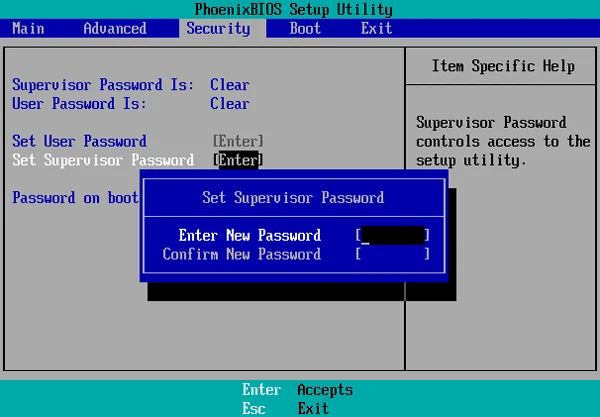
The firmware password is the older trap and still the costliest. IT departments often set a supervisor password in the BIOS to stop employees from changing boot settings, and nobody remembers to clear it before the laptop is sold.
On a ThinkPad, that password is not a minor inconvenience. Lenovo has no service procedure to remove a forgotten supervisor password, so the fix is a new system board, paid for by the owner.
What I Check Before Buying an Ex-Corporate Laptop
I do not buy a used laptop without seeing it start up, even from a seller with good ratings. Online, I ask for photos or a short video of each step instead. The order below catches the expensive problems first.
- Enter the BIOS setup screen and confirm no supervisor password prompt appears.
- Look for an asset tag field in the BIOS with a company name or inventory number.
- Reset Windows, connect to Wi-Fi, and watch for any work or school sign-in screen during setup.
- On a Mac, confirm setup reaches the normal Apple Account step without a Remote Management screen.
- Check the processor generation against Windows 11 support.
- Run a battery report and compare full charge capacity with design capacity.
If the seller refuses the reset step, I walk away. A legitimate refurbisher has nothing to fear from a laptop that sets up cleanly in front of a buyer.
Why I Often Prefer Retired Business Laptops
Here is my opinion, and I hold it firmly. A four-year-old business laptop from a corporate fleet is often a better buy than a new budget consumer model at the same price.
A used business laptop may offer better build quality and long-term value than a brand-new budget model. In the following video, Salem Techsperts explores why older business laptops can be a smarter choice for everyday users and what makes them worth considering.
Business lines tend to use sturdier hinges, spill-resistant keyboards, and standard screws, and many still let you replace the battery, SSD, and memory. Parts stay available for years because companies demand it. My own surplus machine has survived two cross-country moves, a coffee spill, and three years of travel in a backpack.
For owners who want even greater control over repairs, the MNT Reform laptop offers public schematics and modular components. Its open hardware approach goes beyond the replaceable parts found in many business laptops.
The weak points are predictable. Batteries and charging ports are among the parts that wear out first, and a replacement battery for a common business model usually costs far less than the discount you got. Budget for one and you will rarely regret the purchase.
The Sticker I Left On
That surplus laptop on my desk has a new SSD, a fresh battery, and 16GB of memory I pulled from my labeled parts bins. Total investment, including the original $140, came to about $230.
Before I bought it, I spent five minutes in the BIOS checking for a supervisor password and an asset tag, then watched Windows set up without a company sign-in.
Run the same checks on any used laptop with a “Property of” sticker, and the retired company machine may turn out to be the best one in the listing.